For most of the last twenty years, automated testing won the argument. Tests should be deterministic, runnable in CI, gating merges, written as code. Anything else got pushed to the margins - into the category of "manual testing," which got conflated with scripted manual testing, which is rightly seen as the worst of both worlds: slow like manual, rigid like automated.
The casualty was exploratory testing - the practice of someone skilled actually using a product, forming expectations from its own affordances, and noticing where reality and those expectations diverge. This was always the highest-yield form of QA per hour invested. It found the bugs scripted suites missed, because scripted suites can only verify what someone thought to write down, and the most consequential bugs are the ones nobody anticipated. But exploratory testing required scarce, expensive, attentive humans. So it got defined out of existence at most companies, surviving as a quaint thing the QA team did before major releases, if it survived at all.
The economics that killed the practice just inverted. An AI agent - Claude Code, in our case - can do exploratory testing continuously, unattended, for the cost of a subscription. Not as good as a top-tier human exploratory tester, but available all night, every night, and that compensates for a lot.
We sent one in to test our product. Here's what we learned.
The bookends
Before what the agent did, the framing that made it obvious to try.
Software testing has roughly three layers. Unit tests verify that small pieces of code do what their author thought they should. Scripted end-to-end tests - Selenium, Playwright, Cypress - drive the assembled product through pre-written workflows and assert on pre-defined outcomes. Exploratory testing skips the script entirely: someone uses the product, forms expectations from its affordances, and notices when reality and those expectations diverge.
AI is usefully cheap at the top and bottom layers. It writes competent unit tests from a codebase fast enough that the marginal cost of coverage approaches zero. And it can drive a browser, comprehend a product, form expectations, and notice incoherence - which is what exploratory testing actually requires.
The middle layer is the expensive one, and most teams' QA engineering effort lives there. Scripted E2E suites exist largely because exploration wasn't affordable: you couldn't have a senior tester wandering through every build, so you wrote down the most important user flows as code and re-ran them mechanically. That work was always a compromise. It catches the regressions you anticipated and misses the bugs you didn't, which are the ones that matter.
Once exploration is cheap, the middle layer doesn't disappear, but it shrinks. A small allowlist of business-critical flows - billing, auth, anything where silent failure is unacceptable - still belongs in deterministic scripted form, because you want a hard gate, not a probabilistic agent. Everything else moves up the stack to the exploratory agent, which covers more ground, adapts to UI changes automatically, and finds the bugs the scripts wouldn't have thought to look for.
I should be clear about where I do not want AI: the architecture and the load-bearing implementation choices that determine what the product actually is. Those are mine, and I think experienced engineers should be careful about ceding them. But the testing layers that surround those choices - verifying that small pieces work, exercising the assembled whole - are exactly the kind of mechanical and exploratory work AI does well right now. The unit tests defend my decisions against my own future mistakes. The exploratory agent surfaces the consequences of those decisions when I'm not looking.
This post is about the bottom layer in that picture: what it looks like when an AI agent runs exploratory testing on a real product, with no script, no test plan, no scaffolding beyond a description of what the product does.
What the agent does
I gave Claude Code one file: qa/CLAUDE.md. The first few lines establish the contract:
You are an autonomous QA engineer for Yovico.ai. This file defines your
complete operating procedure. Follow it from top to bottom every session.

../REQUIREMENTS.md is your test oracle - every session must test against it.
No selectors, no click coordinates, no expected DOM - none of the apparatus a Playwright suite requires. The rest of the file describes what tools are available (a browser, a database, GitHub), and what the rules are: don't touch production, file bugs immediately, write a session retrospective, exit cleanly.
The agent reads the requirements doc. That document is our present-tense spec - what the product does today, not what we want it to do - and the agent uses it to form expectations about what it should encounter when it explores. Then it explores. It opens the browser, creates a fresh account, navigates the product, and probes whatever it finds. It compares what it sees to what the spec says. When they diverge, it files a GitHub issue with steps to reproduce, the expected behavior from the spec, and what it actually saw. When it's done, it writes a session retrospective and exits.
The next session picks up where the last one left off. Before it tests anything, it reads a persistent log of every open issue - so it doesn't refile things it already knows about. Then it checks git: did any commits reference those issue numbers? If so, it marks them for verification. The rules for that log are explicit in the file:
- Do not refile any issue already listed as open or fixed-unverified.
- When you find evidence a known issue is fixed, change its status to
  fixed-unverified - do not close yet.
- When you explicitly verify the fix works end-to-end, change to
  fixed-verified and close the GitHub issue:
  gh issue close <N> --comment "Verified fixed in <commit>"
During exploration, when it encounters a previously filed issue, it re-runs the reproduction steps. If the fix holds, it closes the issue. If it regressed, it reopens it. New bugs get filed. The log is clean before the session ends.
This is the full loop a human QA engineer runs: find bug, file it, watch for the fix, verify end-to-end, close. The agent runs it every night.
The agent also maintains a second persistent file: a log of known quirks - not bugs, but workarounds the product requires of any automated agent trying to use it. The most instructive entry:
## React controlled textarea - native setter required

fill() / textarea.value = x bypasses React's synthetic event system.
The Send button stays disabled because React's internal state never updates.

Workaround:
const nativeSetter = Object.getOwnPropertyDescriptor(
  HTMLTextAreaElement.prototype, 'value'
).set;
nativeSetter.call(textarea, text);
textarea.dispatchEvent(new Event('input', { bubbles: true }));
sendBtn.click();
The agent hit this on its first session, wrote down the fix, and has applied it correctly on every session since without being told again. That's the operational definition of institutional memory: something the team knows that doesn't have to be rediscovered.
There is no plan beyond that. The agent generates one each session from what the product is actually doing and what changed in git since the last run - areas touched by recent commits get deeper scrutiny; stable areas that have passed three consecutive runs get a quick smoke check. When the product changes, the agent's priorities change with it automatically. The maintenance burden of a traditional test suite, which is the dominant cost of QA at most teams, isn't there.
This sounds like marketing copy until you watch it happen. The agent is not executing a workflow. It is figuring out the product, and reporting where the product fails to be internally coherent. That's a different category of activity than running tests, even though tests are what fall out of it.
What it found
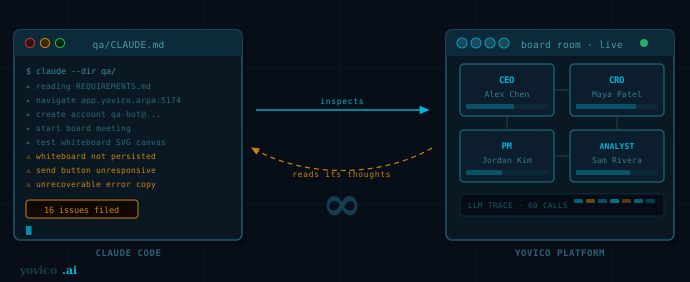
Sixteen issues in one session, overnight, for $100 a month - less than a single hour of a junior contractor's time. Most were the kind a careful developer would have caught: missing tooltips, confusing copy, edge cases in form validation. The interesting ones were the ones that only appear when someone actually uses the product rather than tests it in isolation.
A bug where activating one tool silently breaks another tool nearby. Caught because the agent moved fluidly between features the way a real user would - which we never did, because we always tested features in isolation.
A misleading error message when a session is interrupted. The agent reloaded the page mid-session to test persistence and saw "this session ended due to an unrecoverable error." The session hadn't ended; the reload had dropped a WebSocket, which is fine. But the message was wrong. We would never have caught it because we never reload mid-session.
A spec ambiguity, surfaced by the agent filing a bug for behavior we considered intentional but had never written down. The agent forcing the question - is this a bug or a feature? - made us decide and document. That's itself a useful outcome.
It also noticed things that weren't on any checklist. Sections of the product reachable only through unlabeled icons. Search fields that appear to filter by display name but actually filter by internal ID, silently returning zero results when you guess wrong. These come from an agent that's using the product, not exercising test paths. They don't show up in scripted tests because nobody scripts the act of getting confused.
What it sees
The agent has access to the full Chrome DevTools surface - not just screenshots, but network traffic, console output, performance timelines, memory snapshots, and security and privacy signals. This is a different category of signal than what a Playwright or Selenium script sees.
Screenshots still matter, and the visual critique instruction is explicit:
Visual critique runs throughout. Whenever you navigate to a new screen,
take a screenshot and read it the way a first-time user would. Ask:
- Are all actions labeled? (icon-only controls with no tooltip are a defect)
- Is the information hierarchy legible on a fast scan?
- Does the copy tell a stranger what to do next?
- Do any empty/zero states leave the user with no explanation or next step?

Heuristic: if you had to hover, guess, or re-read something twice, file it.
LLMs are trained on enough visual material that they have genuine working intuitions about UI: whether a label is ambiguous, whether an action is discoverable, whether a hierarchy survives a fast scan. The agent applies those intuitions automatically, because it's literally looking at the rendered page and forming the same impressions a first-time user would.
But the deeper value is the DevTools layer underneath. The agent watches the network tab while it navigates - it sees which API calls were made, which returned errors, which were slow. It reads the console: warnings, uncaught exceptions, failed resource loads that the rendered page hides from view. It checks performance: layout shifts, slow paint, long tasks. Memory and security signals surface things that would otherwise require a specialist to go looking for.
This matters because most bugs that escape to production don't announce themselves visually. A failed background API call that leaves the UI in a stale state looks fine until you know what the network tab showed. A memory leak shows up in the performance timeline, not in the rendered output. A missing security header doesn't show up at all - unless you look.
Concretely: the agent flagged the Personas section as hard to find. Not because a test case told it to check discoverability - there was no test case. It looked at the header, saw an icon with no label, and noted that nothing indicated what the icon did or that it led to personas. That went in as an issue. Separately, it caught a console error from a failed API call that the UI silently swallowed - the page looked correct, but the network and console told a different story.
These are failures of communication in two different registers: what the product shows, and what it's actually doing underneath. Neither surfaces in a scripted test. Both surface when you give an agent full DevTools access and tell it to pay attention.
The recursive part, briefly
The product I'm building is itself an AI agent platform - a place where multiple LLM-driven personas argue about strategic questions while a human watches and occasionally joins in. We ship a developer-facing trace panel that lets anyone inspect those agents' internal reasoning during a meeting: every LLM call, every system prompt, every coordinator decision.
Claude Code tested it. An AI agent reading the internal LLM traces of other AI agents, filing GitHub issues where the displayed UI was inconsistent with what those agents had actually been told. The recursion is structurally tidy and was, I'll admit, satisfying to watch. But it's a side effect of what we're building, not the point. The point is that exploratory testing - at any layer of the stack - used to require a human and now doesn't.
What we didn't have to write
What's missing from this story is most of what makes traditional test automation expensive: the test cases, the selectors, the expected outputs, the maintenance when any of those drift, the framework holding it together. The agent reads the product and the spec, decides what matters, and goes. The investment is in writing a clear description of the product - which a team should be doing anyway - plus a small amount of operational scaffolding to run the agent unattended and capture its output.
The unit tests, meanwhile, are written by AI from the code itself. Also fast, also cheap, also asks almost nothing of me. Between the two layers, the human time spent on testing has dropped sharply - and the bug yield has gone up, because the exploratory layer now runs every night instead of running rarely or not at all.
The middle layer - the Selenium suite I'd otherwise be maintaining - is reduced to a small allowlist of must-pass critical flows. Most of what would have been scripted is now exploratory instead, which is both cheaper to maintain and better at catching the bugs we didn't anticipate. AI does what's mechanical (unit tests) and what's judgment-based but was previously gated by human cost (exploration). The architecture and the load-bearing implementation choices remain mine. Each layer does what it's actually good at.
What it can't do
The agent can verify that a persona responded. It cannot judge whether the response was good. "The CEO said something" is a passing test; "the CEO gave strategically relevant advice" still requires me. A second-pass LLM judge would close part of this gap; we haven't built one yet.
Long sessions degrade. The agent's context fills up over a long run and coherence drops. We've structured the entry point so each section of testing is self-contained, but very long sessions still suffer.
Timing flakiness is real. The agent occasionally proceeds before a slow operation finishes. We've added explicit waits and it's mostly fine.
These are tractable problems, not paradigm-breakers. The loop closes: an unattended agent runs every night, finds real bugs, files actionable reports, for the cost of a subscription.
The bottom line
The verification paradigm dominated QA for a generation because exploration required humans and humans don't scale. That premise just stopped being true. Exploration is now something an agent can do at the same scale as automation, with the same economics, while still doing the thing humans were valuable for: noticing what isn't on the checklist.
The teams that figure this out before the rest of the industry catches up will ship better products with smaller teams. Most won't notice for a while, because most teams have internalized the verification frame and AI slots into it as "better automation." The interesting move is to recognize that AI brought something else back - something the field gave up on for reasons that no longer apply.
If you're a small team with a browser-based product and you haven't tried it: qa/CLAUDE.md is a text file. Run Claude Code from that directory - it reads the file as its operating instructions. Use /loop to schedule it unattended on whatever cadence you want. Start there.
Yovico is a multi-agent AI platform for strategic decision-making. The founding team uses it to run their own strategy sessions. This post was written about a session tested by the same class of agent that powers the product.